Skip to the page
Build Room Copilot

The Secret, official sealFrom the desk of David Cameron Gikandi, author of A Happy Pocket Full of Money and Creative Consultant behind The Secret

For conscious entrepreneurs with adverse childhood experiences.

Abundance GPS · in VIP

Build Room Copilot

Ship the thing that’s been almost ready.

You know how to do the work. The new rate is worked out, and the launch email sits in drafts. Build Room Copilot takes one real piece of work a month from Commit to Ship, the same four steps VIP members work through with David in The Build Room’s live workshops. It drafts with you in your voice, tests the work before anyone sees it, and helps you break the brake as well as the work.

Start your 7-day free trial →

Included in the VIP membership. Seven days free.

It lives in the Abundance GPS Copilot app on your phone and your laptop. Abundance GPS is David Cameron Gikandi’s membership community for conscious entrepreneurs. It lives on Skool, a platform for online communities.

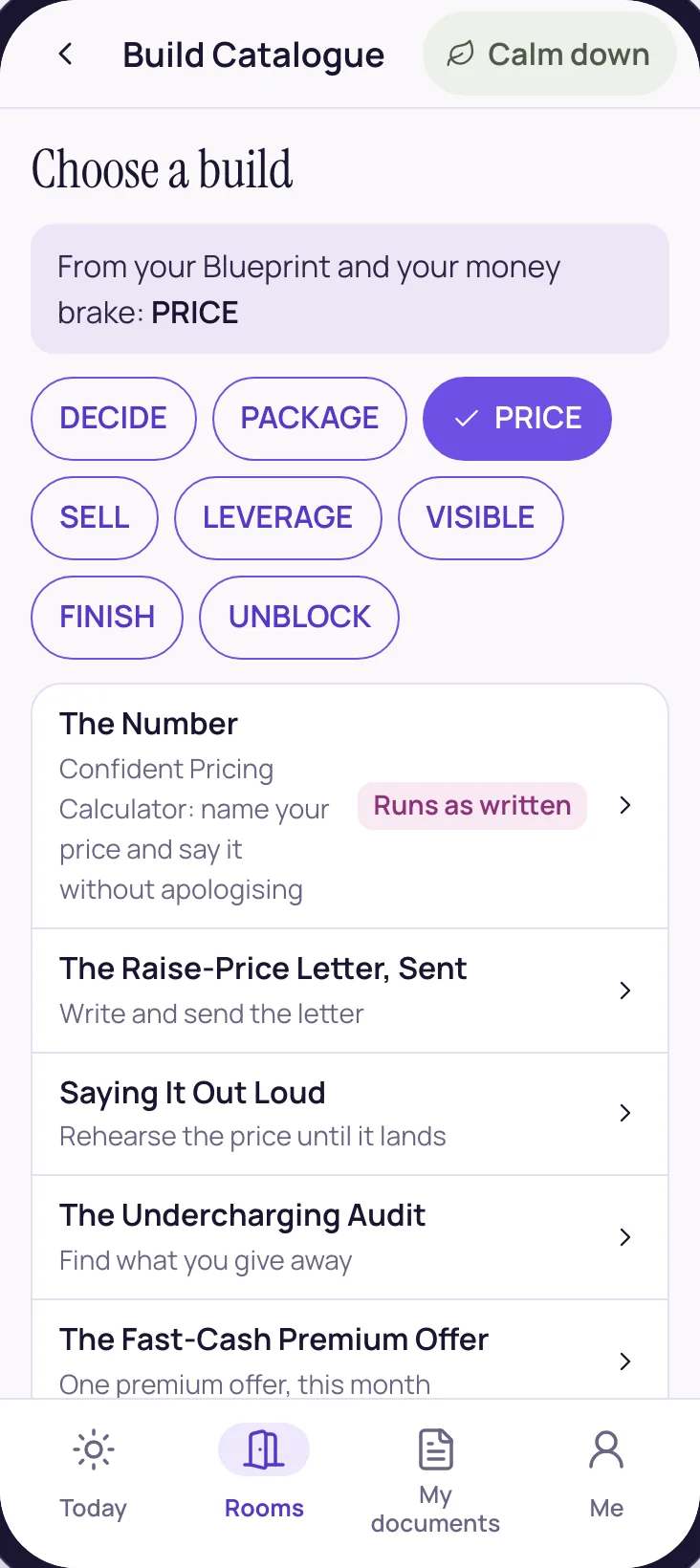
The Build Catalogue, filtered by lane: decide, package, price, sell, leverage, visible, finish, unblock

Choose a build

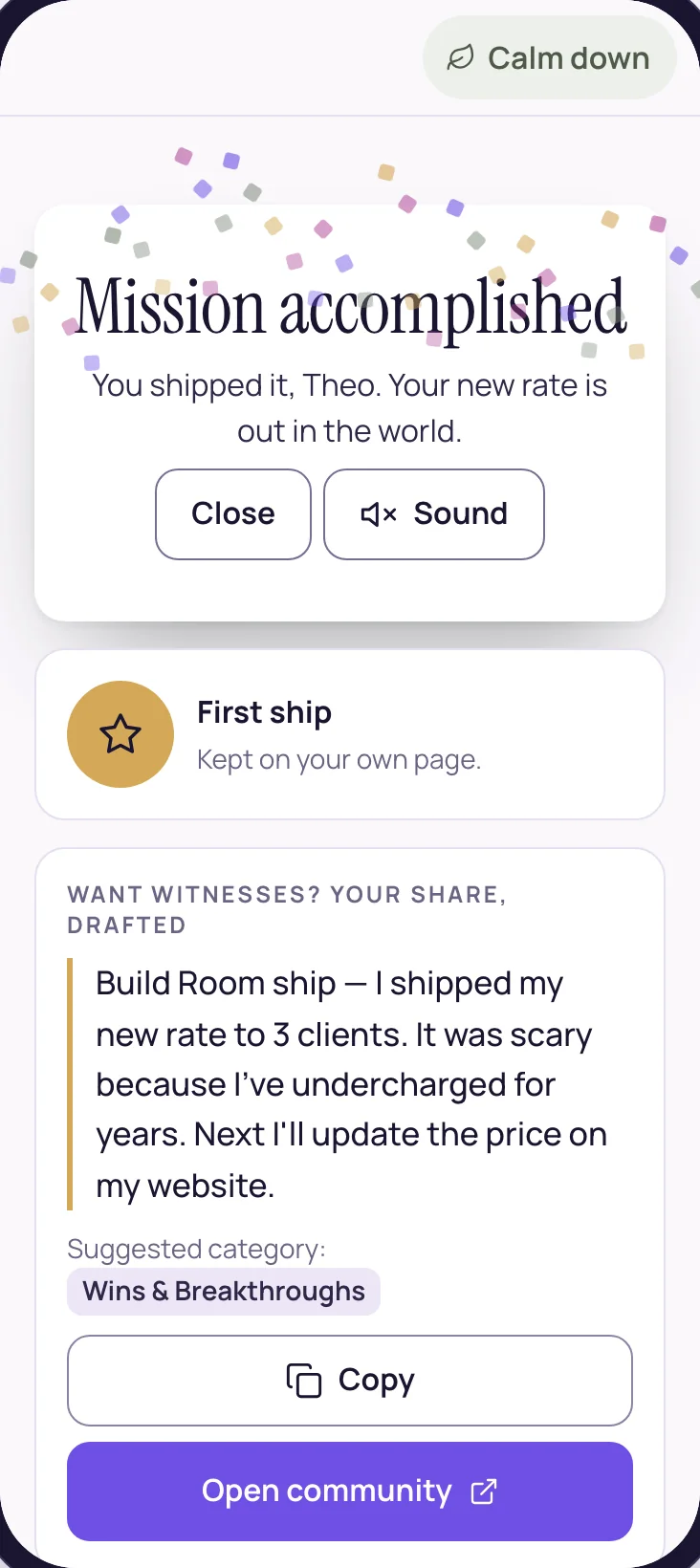
Mission accomplished: the build is logged as shipped

Ship it

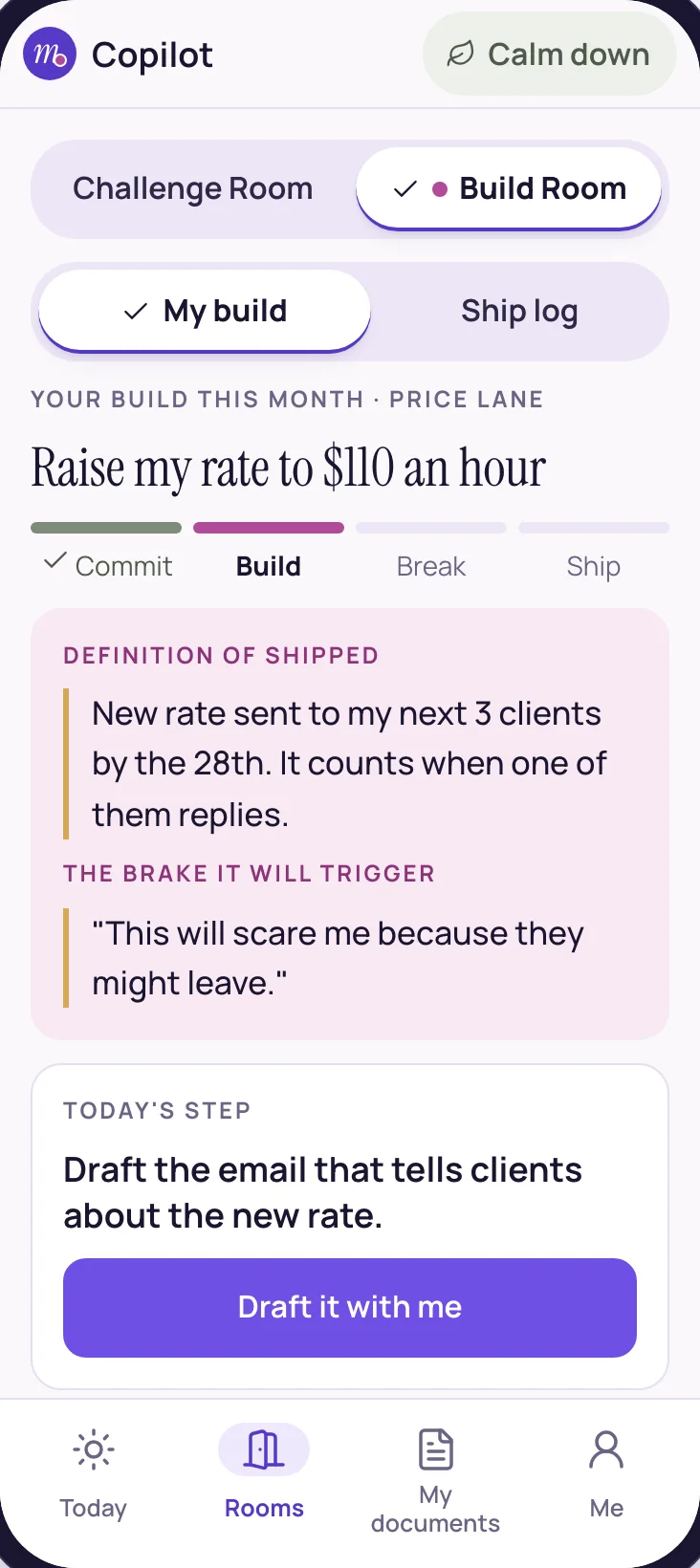
The build card in the Build Room: this month's build, the definition of shipped and the brake it will trigger

Commit to it

First, The Build Room

Every month, VIP members ship one real piece of work in The Build Room

The Build Room is the VIP part of Abundance GPS, David’s community on Skool: four live working sessions a month with David, about 90 minutes each. There are no monthly themes. Each member picks one thing they’ve been putting off, like a price, an offer or a launch, and takes it from decided to shipped with the room watching.

  1. Week 1 · Commit

    Say it in the room

    Name the one thing you’ll ship this month, in front of everyone. Then David works the brake on that exact thing, live.

    You leave with

    A commitment with witnesses, and your brake named.

  2. Week 2 · Build

    Make it

    A short frame from David, then about fifty minutes of building your own piece while he works the room.

    You leave with

    A rough version of the thing.

  3. Week 3 · Break

    Test it

    The room pressure-tests the work before a customer does: what could go wrong, the objections, an honest review.

    You leave with

    What’s wrong with it, found early.

  4. Week 4 · Ship

    Send it

    It goes live in the room. Send the email, publish the page, quote the price.

    You leave with

    A finished thing, shipped.

  • Four live sessions a month, about 90 minutes each
  • Run by David
  • Your own build, every month
  • Every session recorded to the archive
  • Join in any week of the month
  • Included in VIP

Build Room Copilot carries your build through the days between the sessions: the drafts in your voice, the test before anyone sees it, and the brake at every step.

Most of the work is done. The last ten percent is where the brake lives.

You’ve done harder things than this. You’ve built a practice, served clients well and learned more than plenty of the people who teach it. The new offer is mostly written and the new rate is mostly decided. And the last ten percent—naming the price, sending the email, putting the page live—keeps sliding to next week.

That slide is a brake doing its job. It learned early that being seen, charging more or asking for the sale could cost something, and it fires hardest right before the work reaches another person, which is why a better template so rarely moves it.

What moves it is a month with a shape: one build, a clear line for what counts as shipped, drafts in your own voice, a test before anyone sees it, and the brake handled at each step along the way. That’s what Build Room Copilot gives you.


Every build runs on four steps

The same four steps VIP members work through in The Build Room, four live workshops a month with David.

  1. 01

    Commit

    Say what you’ll ship, to whom, by when, and the brake it will trigger.

  2. 02

    Build

    Draft the real thing in your voice, with the brake handled first.

  3. 03

    Break

    Test it before the world does: strengths first, then what might not land.

  4. 04

    Ship

    Put it out, log the proof, and note what you did scared.

See a build in about a minute

From choosing a build to shipping it, in the app.

Here’s how a build goes

Take one example: raising a rate to $110 an hour and telling three clients. Here’s the month, step by step.

  1. 01 · Choose

    Pick this month’s build.

    Browse the Build Catalogue by lane, from Decide and Price to Visible and Unblock, or bring your own. Some builds run as written, start to finish.

    The Build Catalogue, filtered by lane: decide, package, price, sell, leverage, visible, finish, unblock
  2. 02 · Commit

    Say what shipped will mean.

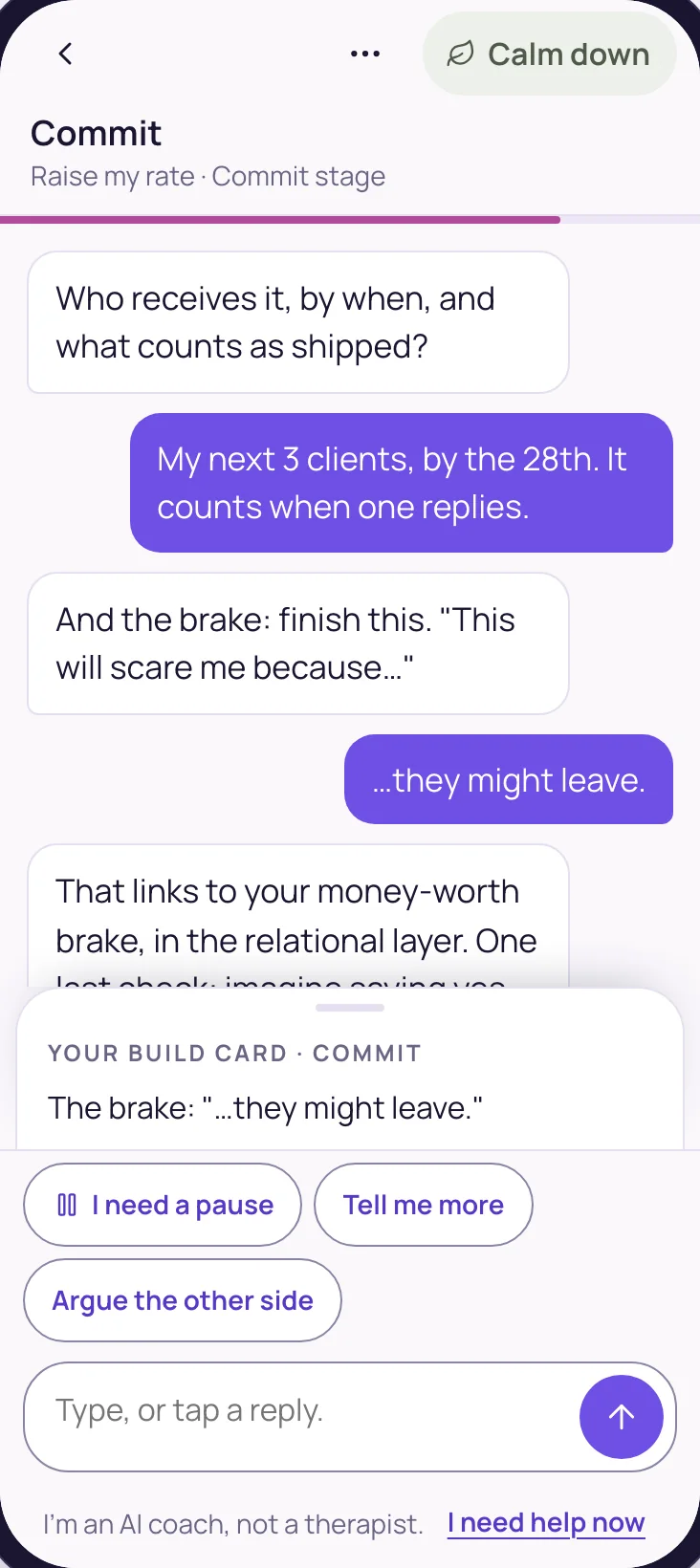
    Who receives it, by when, and what counts. Then the brake it will trigger: “This will scare me because they might leave.” A quick body check asks whether yes feels lighter than no.

    Commit: who receives it, by when, and the brake it will trigger
  3. 03 · Build

    Draft it in your voice.

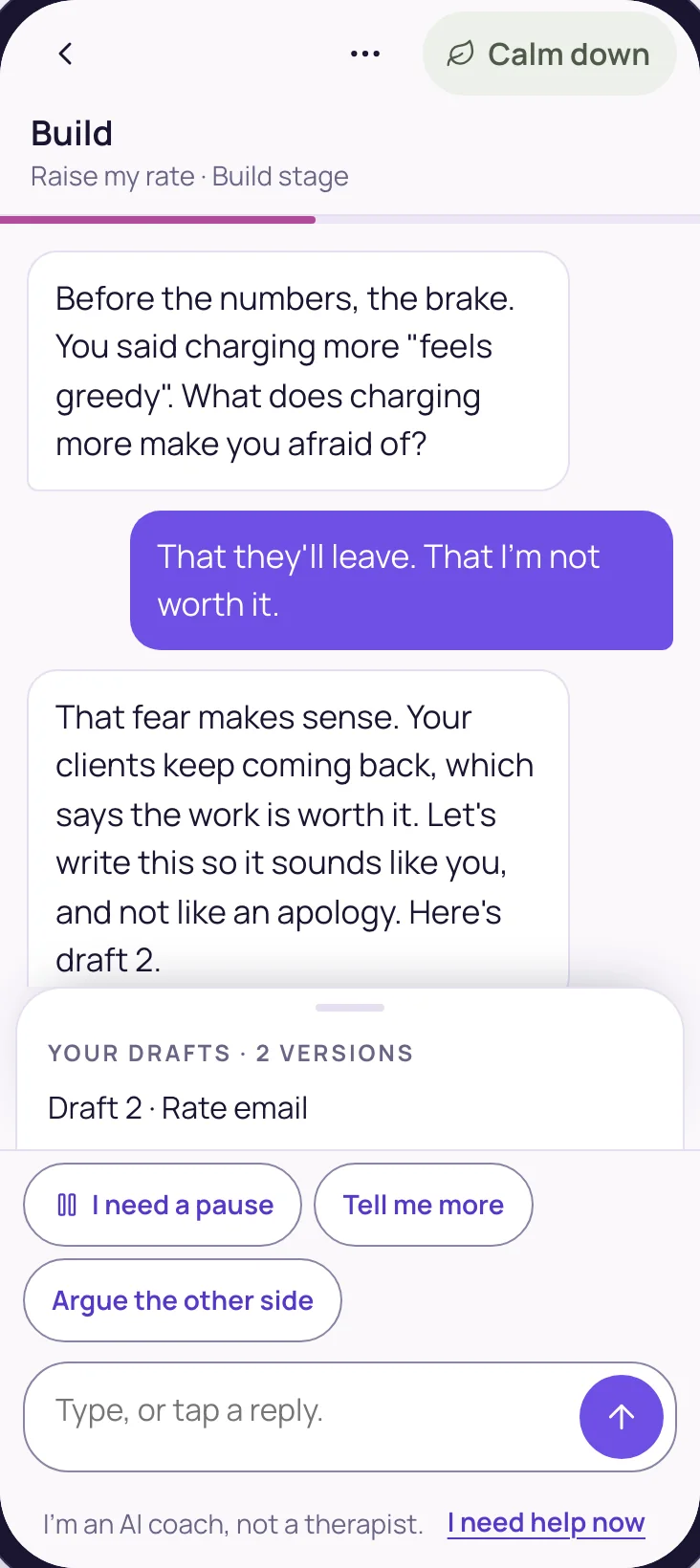
    “Before the numbers, the brake.” Then it drafts the real thing, like the rate email or the price table, in your voice, with blanks where only you know the answer.

    Building on a phone: the conversation and the drafts
  4. 04 · Break

    Break it before the world does.

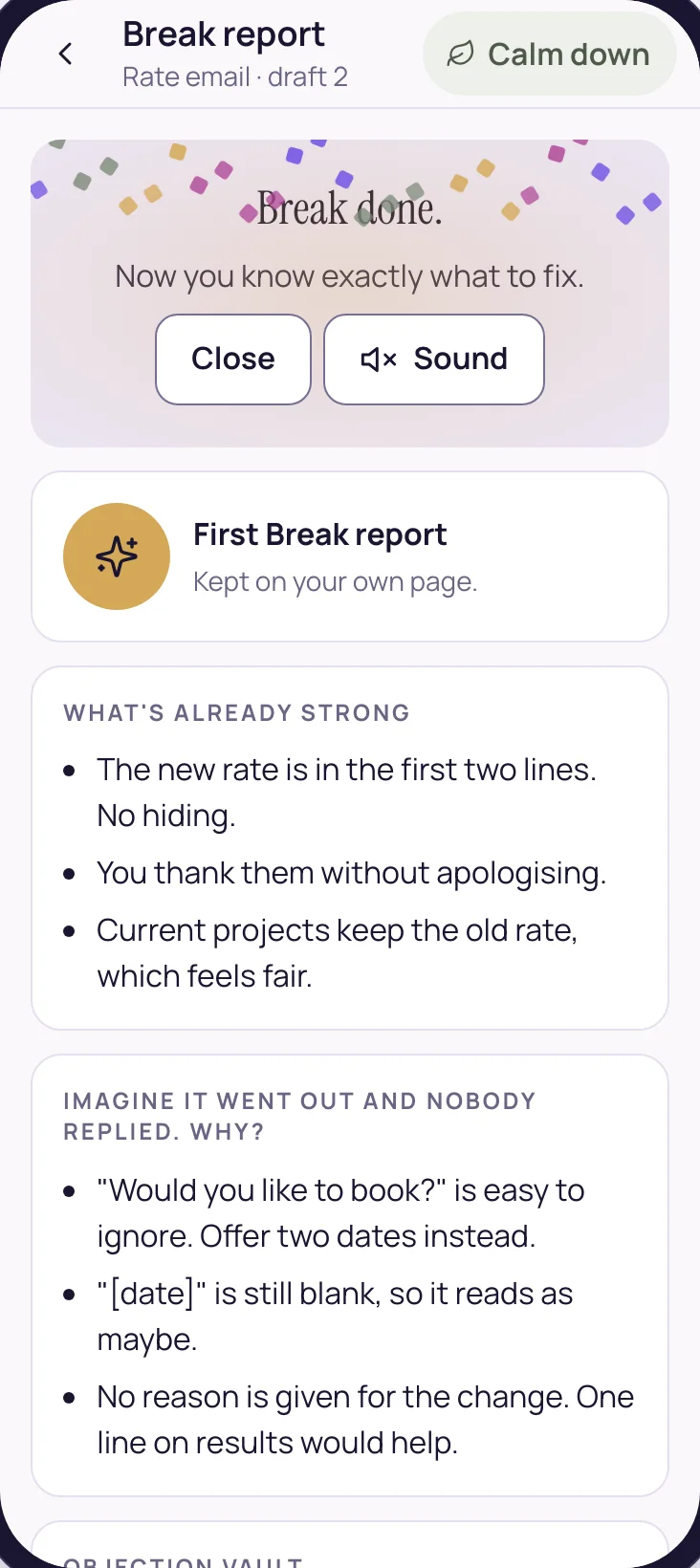
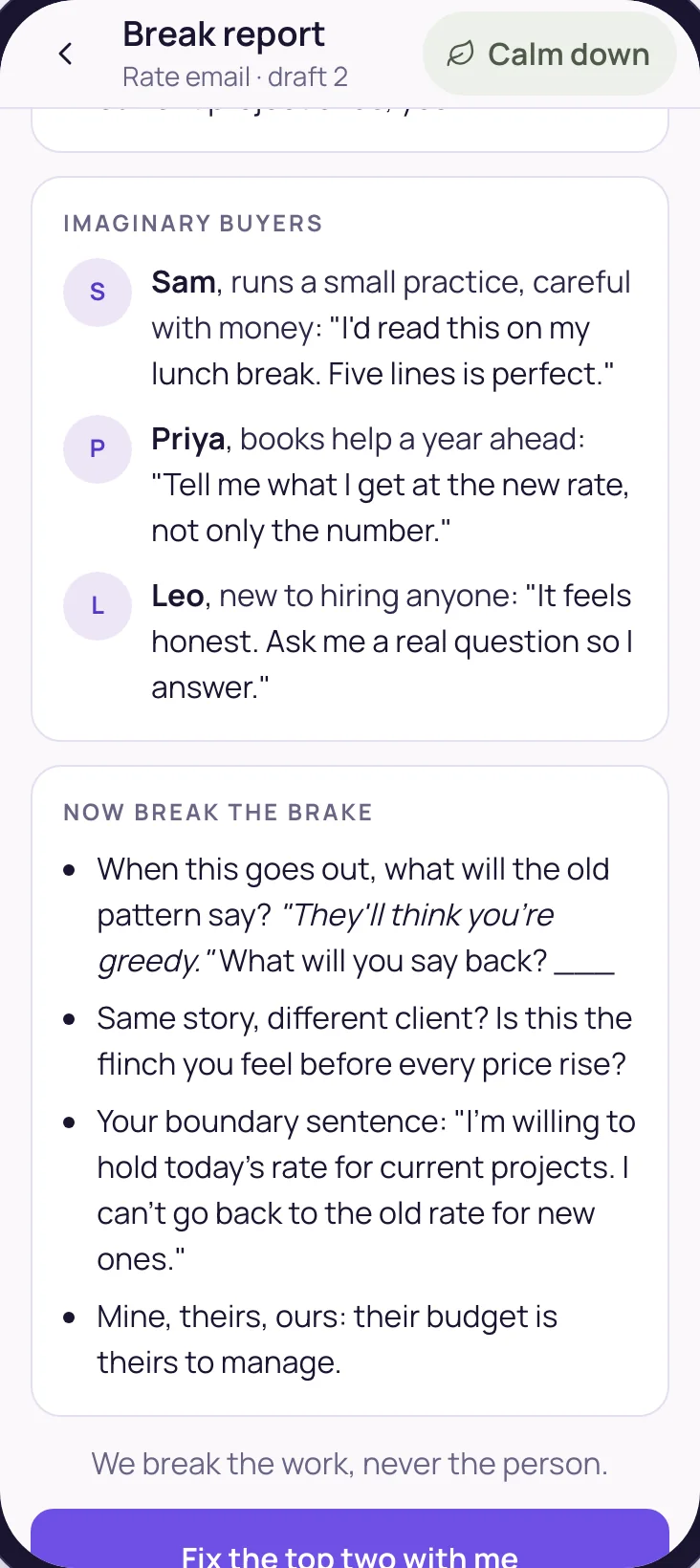
    “Break my thing” tests the work: what’s already strong first, then why it might not land, the objections, and three imaginary buyers, each described for your market. Then it breaks the brake too.

    The Break report: what's already strong, then why it might not land, before it goes out
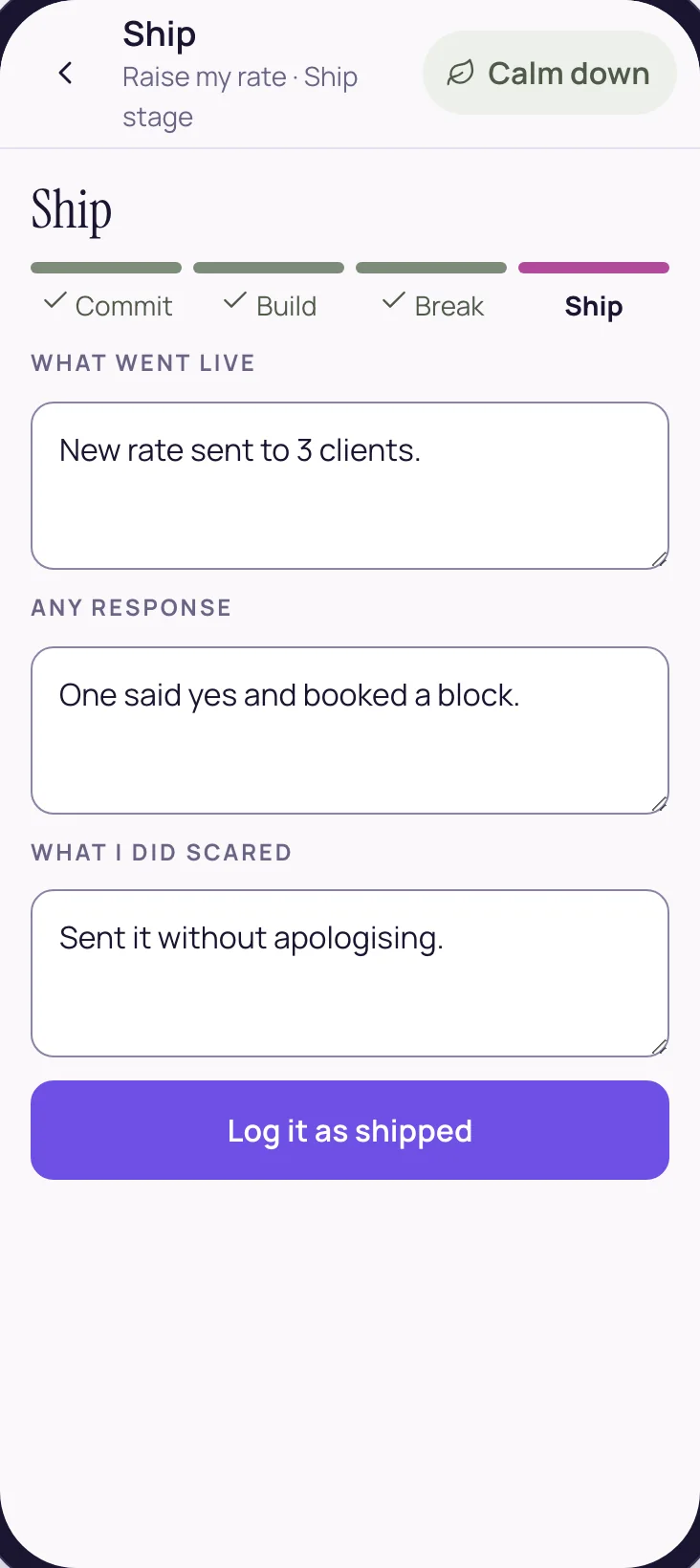
  5. 05 · Ship

    Log it as shipped.

    What went live, any response, and what you did scared. Mission accomplished, and your ship post is drafted for the community, for you to post yourself.

    Mission accomplished: the build is logged as shipped

The live workshops each month follow the same four steps, and the copilot carries the build through every day in between.

Here’s what you can build

The Build Catalogue groups builds into eight lanes, so there’s always a place to start, and each build is one real piece of work that reaches other people.

The eight lanes of the Build Catalogue

  • Decide
  • Package
  • Price
  • Sell
  • Leverage
  • Visible
  • Finish
  • Unblock

From the Price lane, for example

  • The NumberA confident pricing calculator: name your price and say it without apologising. It runs as written.
  • The Raise-Price Letter, SentWrite the letter, and send it.
  • Saying It Out LoudRehearse the price until it lands.
  • The Undercharging AuditFind what you give away.
  • The Fast-Cash Premium OfferOne premium offer, this month.

Or start from your own

  • Bring my ownDescribe what you’ll ship this month, and that becomes the build.
  • Start from my BlueprintIf you’ve finished the monthly 4-Day Break-Free Challenge, it suggests a lane and a build from the plan you made there, your Blueprint.
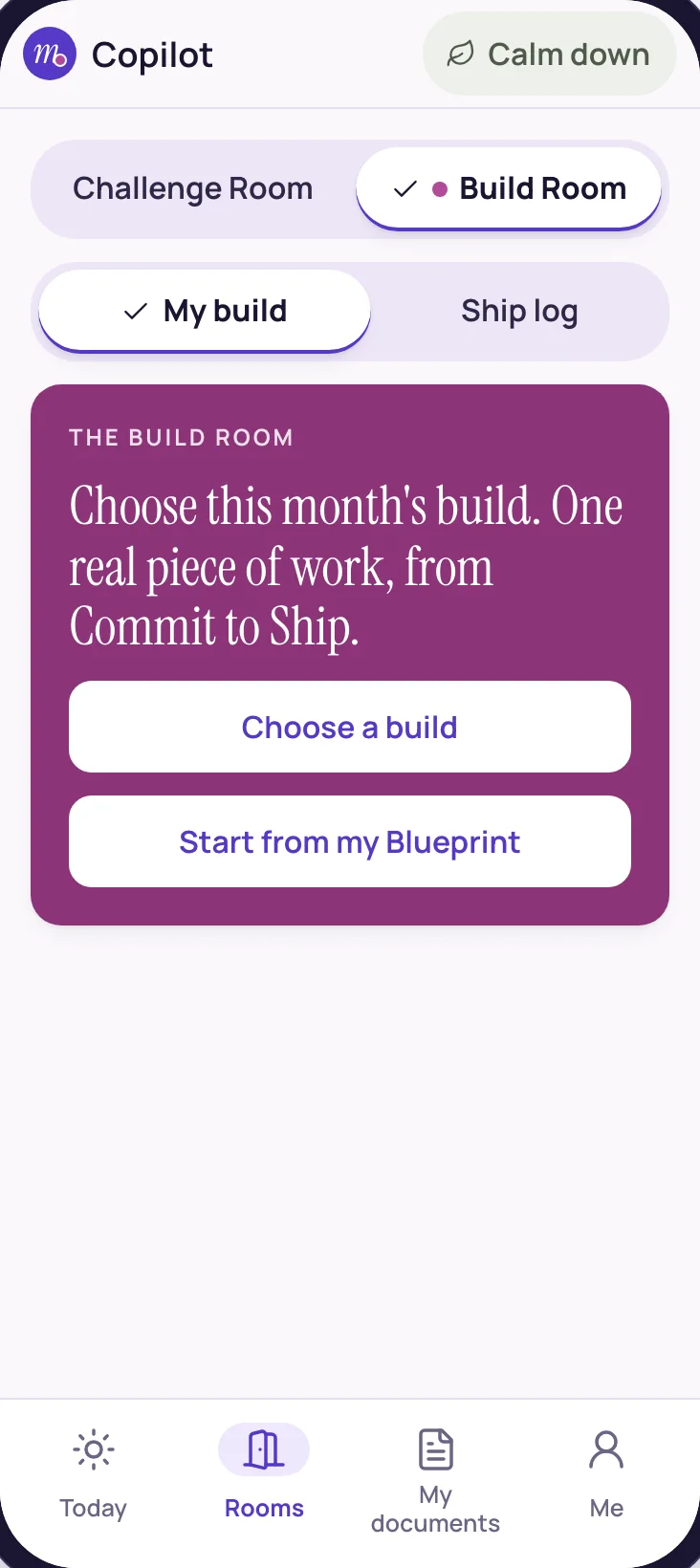
The start of a month in the Build Room: choose this month's build, or start from your Blueprint
The Build Catalogue, filtered by lane: decide, package, price, sell, leverage, visible, finish, unblock

Here’s how it drafts in your voice

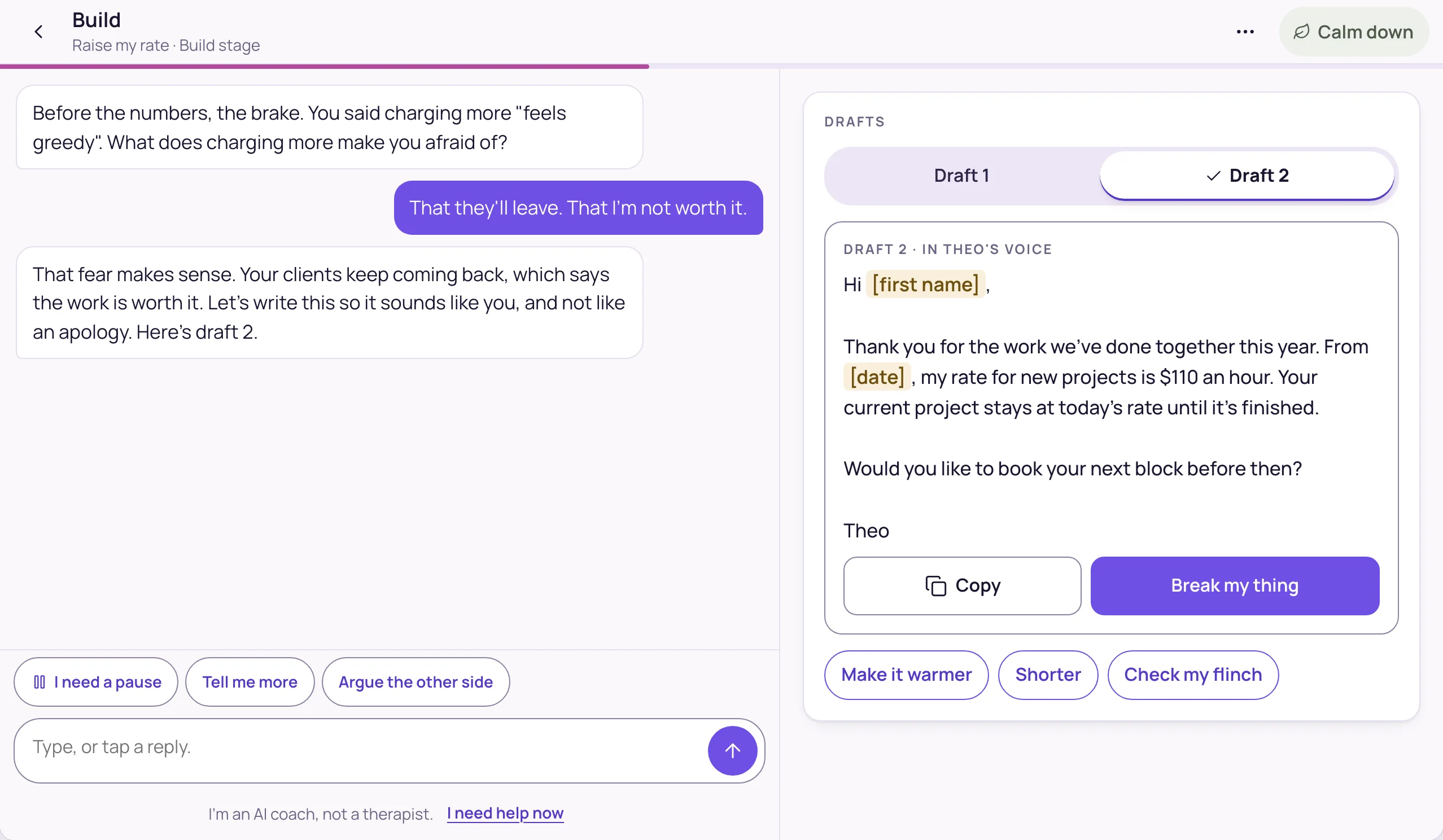
“Before the numbers, the brake.” Every drafting session opens by naming what the work will stir up, then writes the real thing with you.

Building on a laptop: the conversation on the left, the draft in the member's own voice on the right

On a laptop, the conversation sits beside the draft, and every version is kept.

In your voice

It drafts from what you’ve told it about your work and your clients, and marks the blanks only you can fill, like [first name] or [date].

Every version kept

Draft 1, Draft 2 and on. Copy any of them, or ask for it warmer or shorter.

Phone or laptop

On a phone, the latest draft sits right in the conversation. On a laptop, the draft gets its own side of the screen.

Here’s the Break report

“Break my thing” tests the work before anyone sees it, in a fixed order that always starts with what’s working.

  1. What’s already strongFirst, every time.
  2. Imagine it went out and nobody replied. Why?The quiet ways a good piece of work gets ignored.
  3. The objection vaultWhat a careful buyer might push back on.
  4. Three imaginary buyersEach with a first name, a line of context written for your market, and one honest reaction.
  5. Now break the brakeWhat the old pattern will say when this goes out, and a boundary sentence ready for it.

“We break the work, never the person.”

Then “Fix the top two with me”, or “Move to Ship”.

The Break report: what's already strong, then why it might not land, before it goes out
Further down the Break report: the objections and three imaginary buyers from the member's market

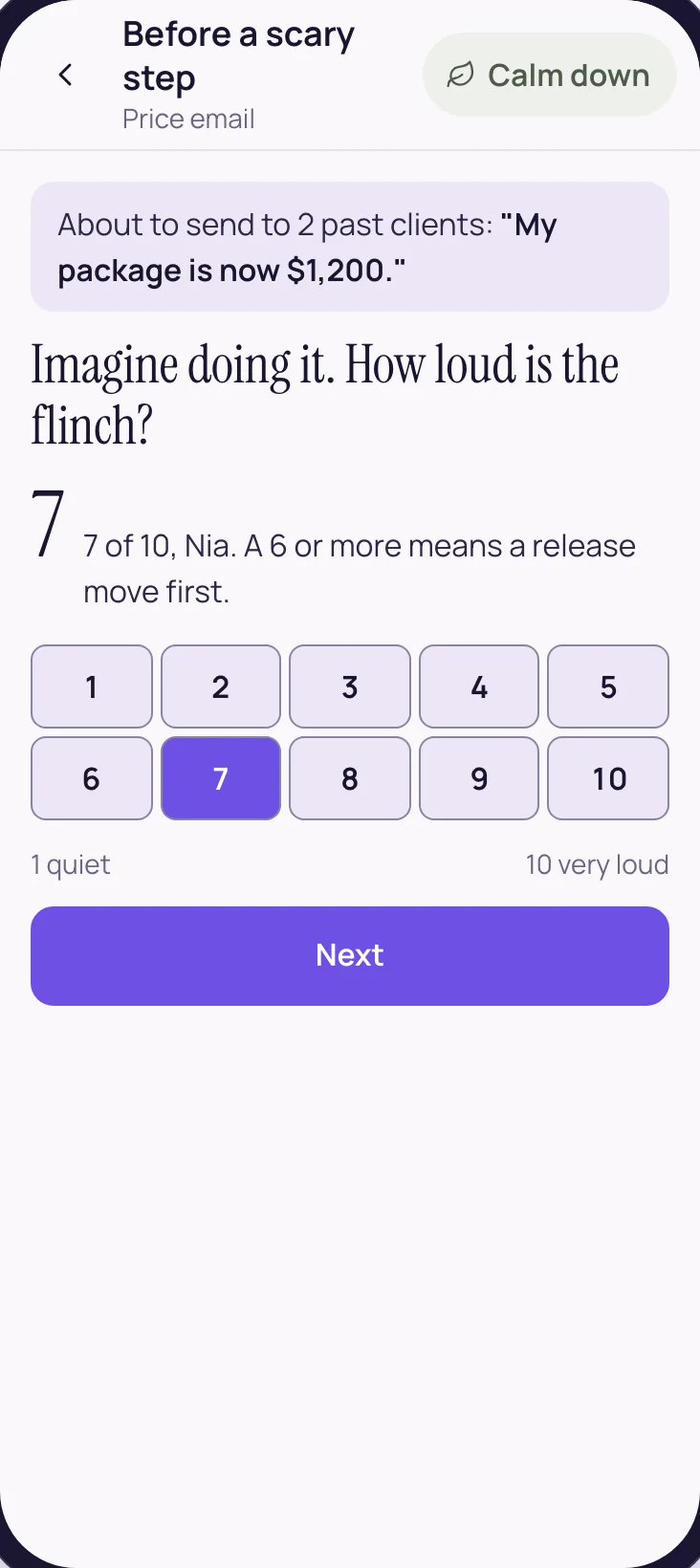
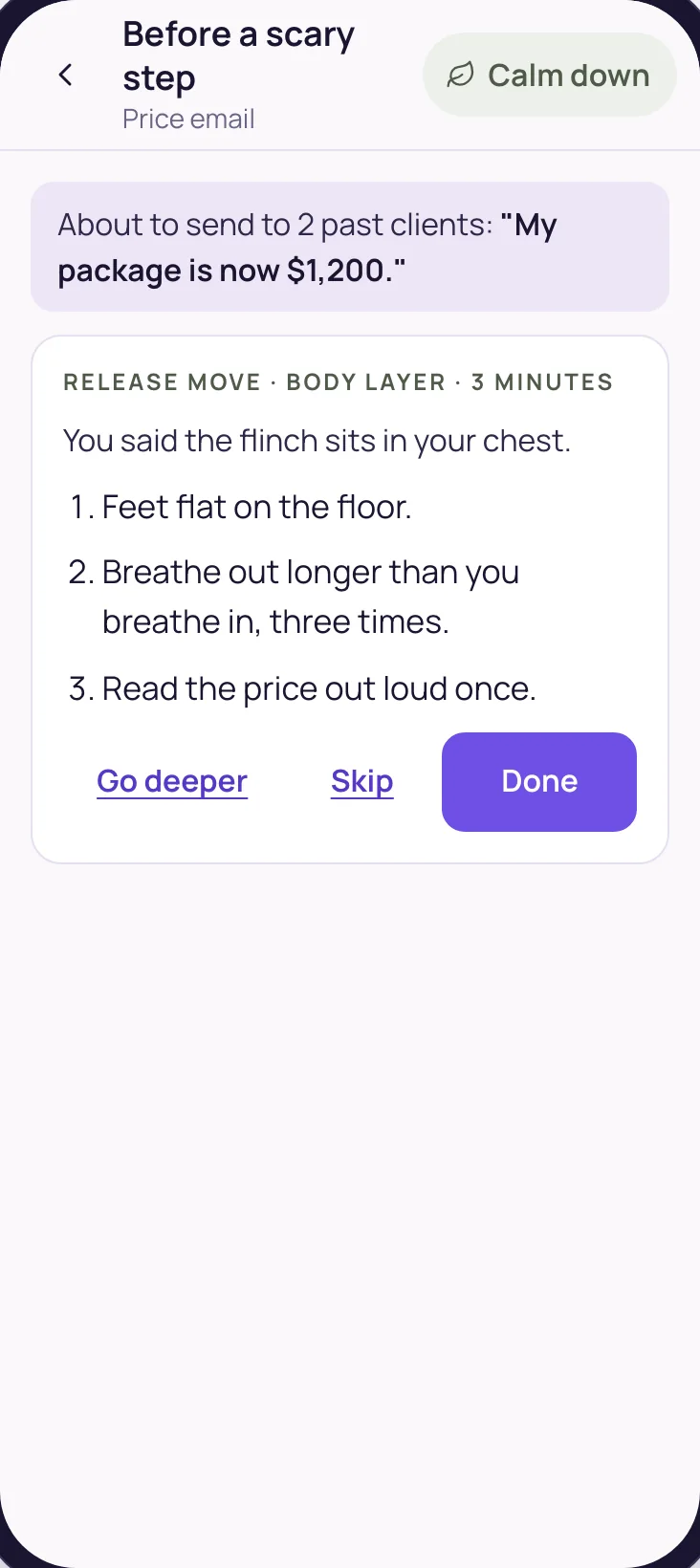
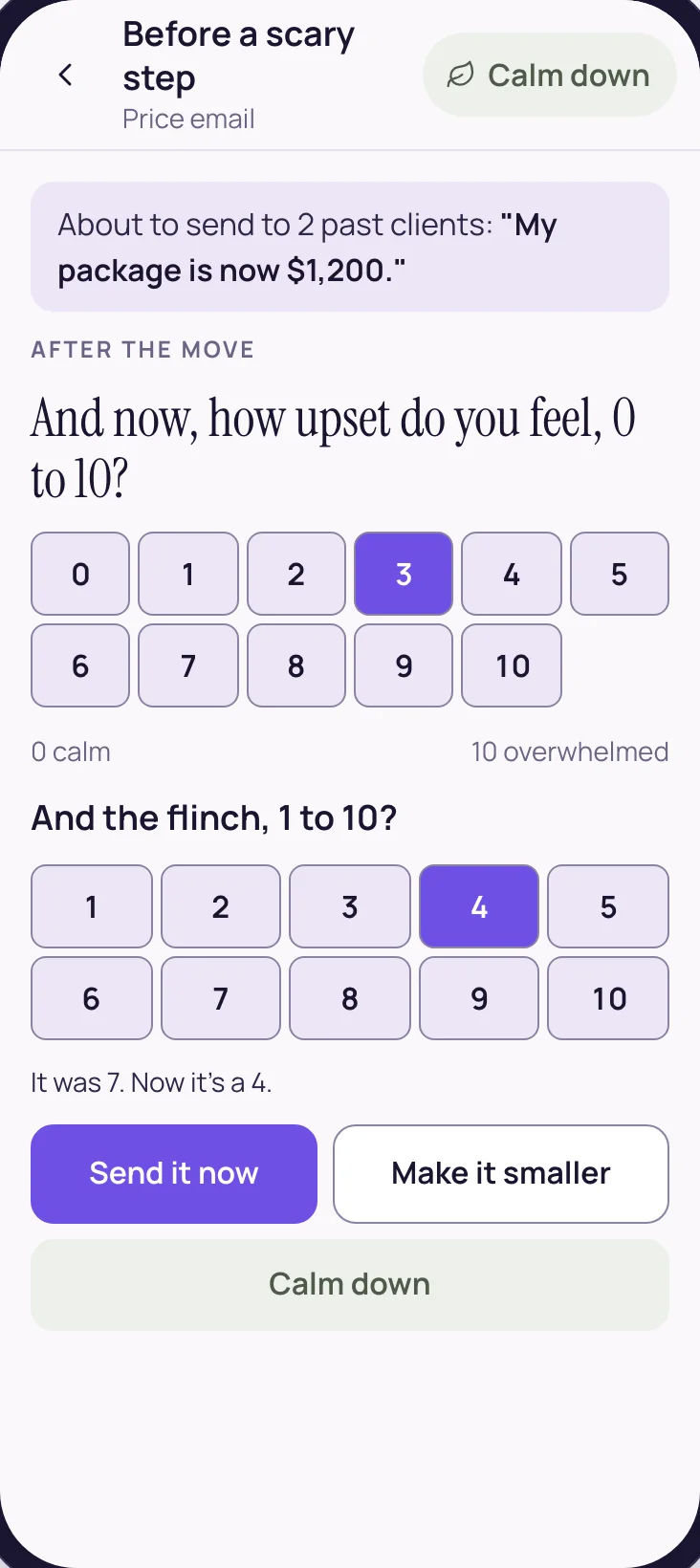
“Check my flinch” sits right on the draft. You rate how loud the flinch is, from 1 to 10. At 6 or more, a release move of a few minutes (a short exercise that loosens the brake) runs first, and then you’re back in the draft.

  • Before a scary step: the member rates how loud the flinch is, 7 of 10

    Check my flinch

    Rate the flinch

    7 of 10: a release move comes first.

  • A three-minute release move matched to where the flinch sits

    Release

    A release move

    Three minutes, matched to where the brake lives.

  • After the move: the flinch was 7 and now it's a 4, with Send it now, Make it smaller and Calm down

    Re-rate

    The number comes down

    “It was 7. Now it’s a 4.”

  • Building on a phone: the conversation and the drafts

    Back to the work

    Back in the draft

    Right where you left it, every version kept.

Pick this month’s build.

The VIP trial opens a look inside Build Room Copilot and one sample Break report.

Start your 7-day free trial →

Seven days free on every membership. Cancel any time inside Skool.

Log what went live, any response, and what you did scared. Then your ship post is drafted for the community, for you to post yourself.

  • Ship: what went live, any response, and what the member did scared

    Ship

    Log it as shipped

    What went live, any response, what you did scared.

  • Mission accomplished: the build is logged as shipped

    The finish

    Mission accomplished

    The big celebration, and your ship post drafted.

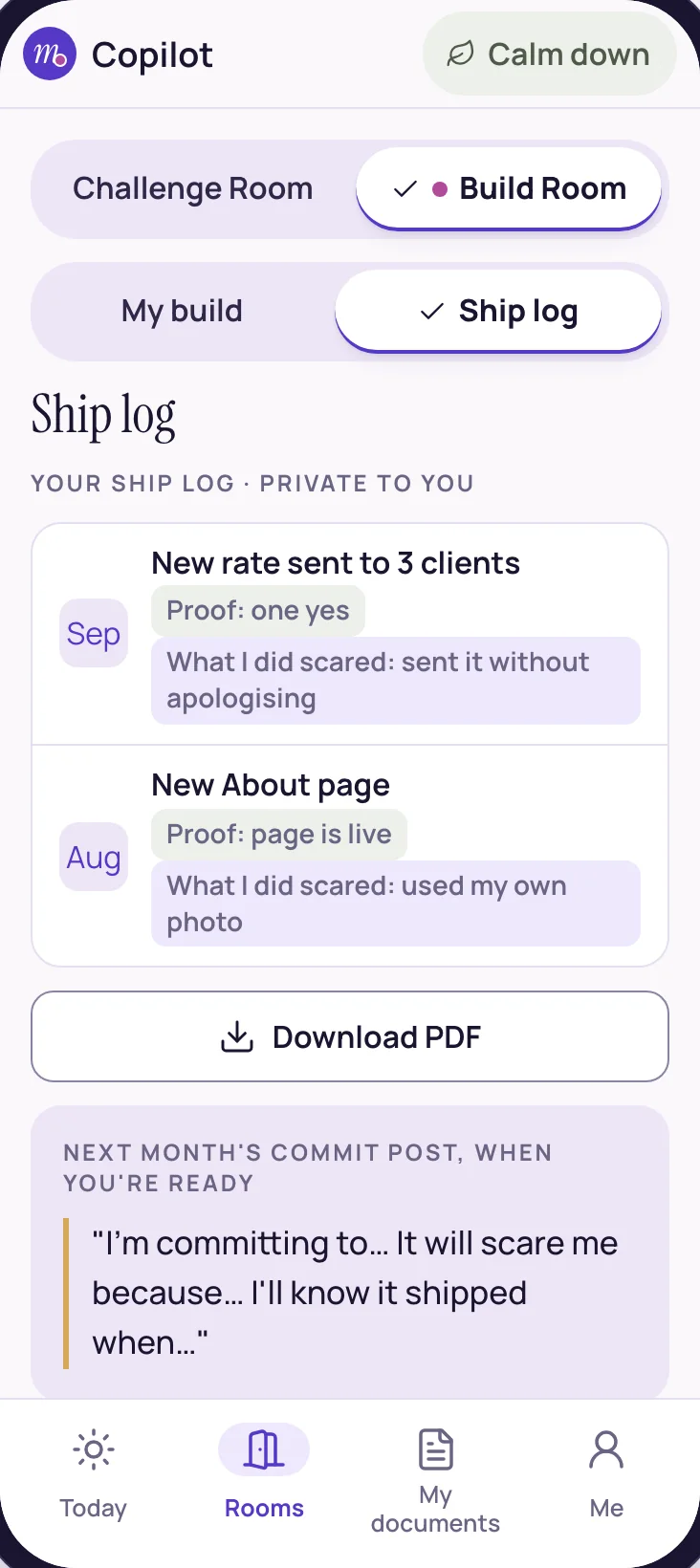
  • The ship log: each month's shipped build, with its proof and what was done scared

    Private to you

    The ship log

    Every build you ship, with its proof and what you did scared.

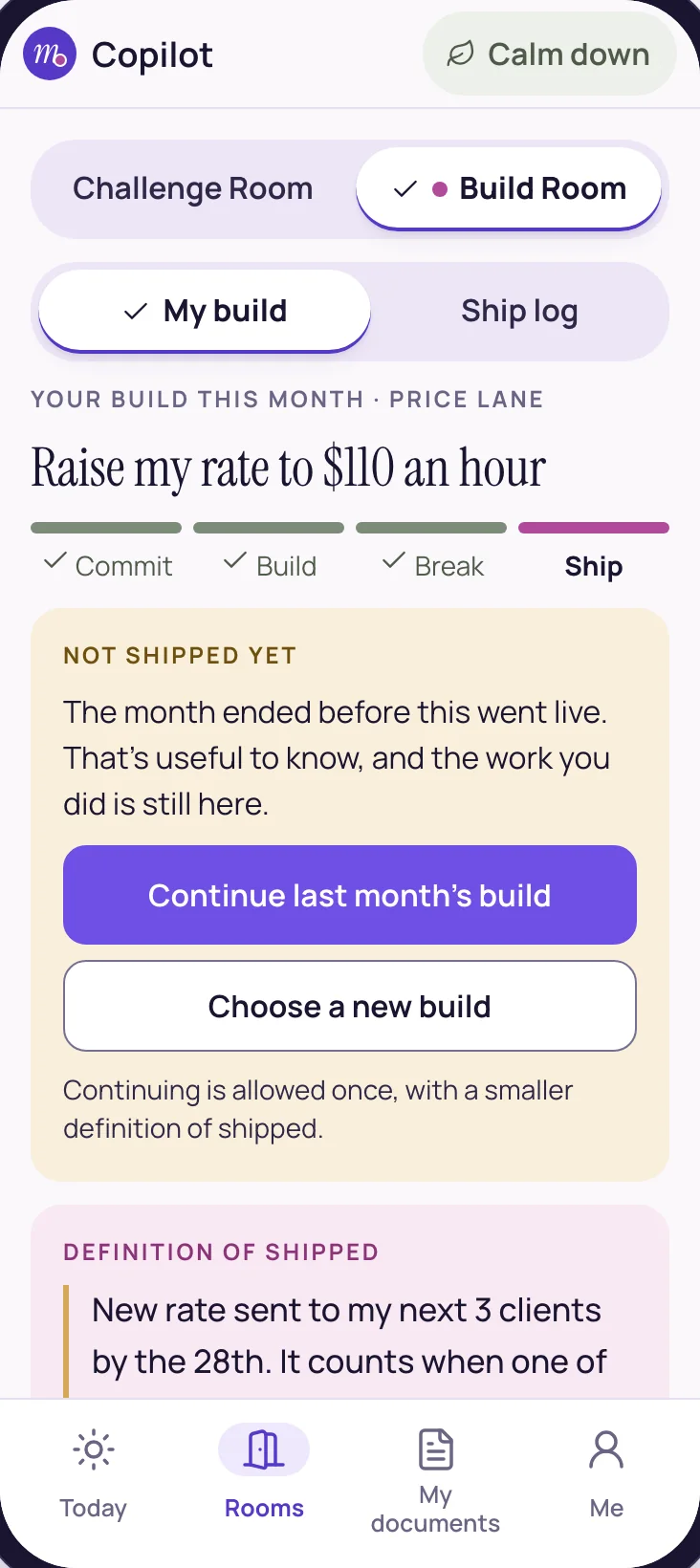
  • A month that ended without a ship says Not shipped yet, with one chance to continue at a smaller size

    If the month runs out

    Not shipped yet

    Never “failed”: continue once, with a smaller definition of shipped.

Here’s how it fits around the live workshops

VIP members meet David four times a month in The Build Room, live workshops that follow the same four steps: Commit, Build, Break, Ship. The copilot carries the build through every day in between.

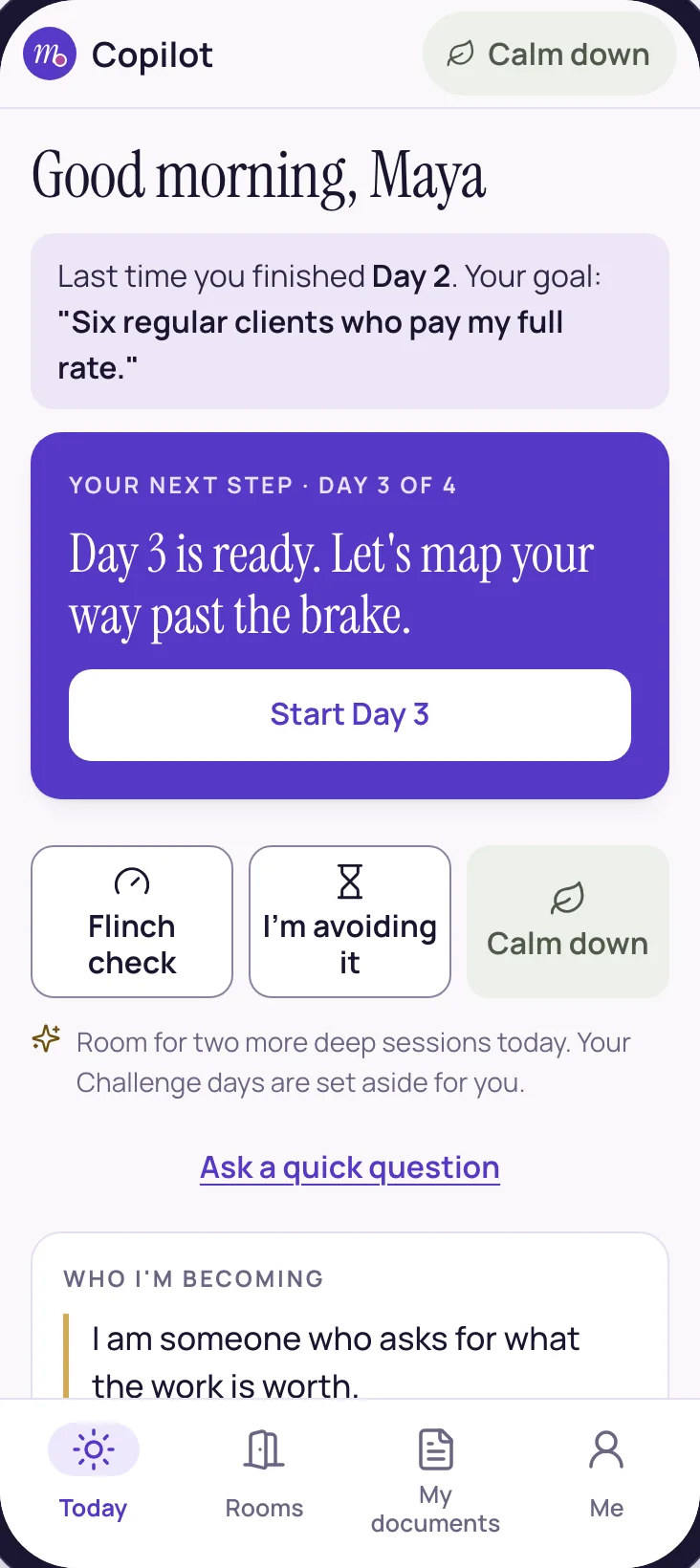
  • Your build on TodayToday, the app’s home screen, keeps your build in view, with its next step one tap away.
  • A daily build check“Did you touch your build today?” Yes, or Not today. There are no streaks.
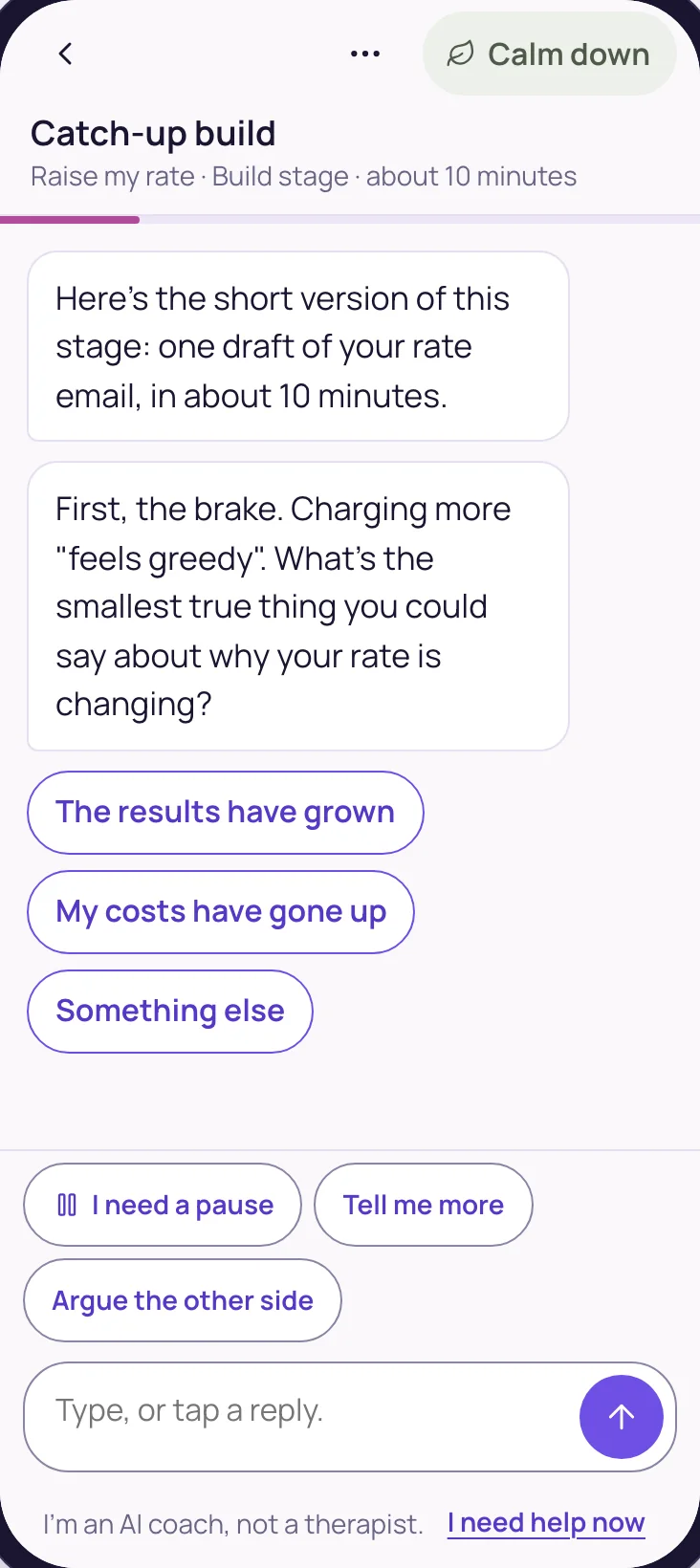
  • A catch-up when a stage stallsIf a stage hasn’t moved after a workshop, a short catch-up of about ten minutes appears. It never mentions a session or says you missed one.
The build card in the Build Room: this month's build, the definition of shipped and the brake it will trigger
A catch-up on this stage of the build, about 10 minutes, offered without ever mentioning a missed session

Here’s what else comes with VIP

VIP includes everything in Premium.

That means every teaching course in the classroom, the weekly live Q&A hour with David, the monthly 4-Day Break-Free Challenge, and Challenge Copilot: help at the moment the brake fires, and your four Challenge documents written with you, in your own words.

See Challenge Copilot →
The Today screen: a greeting, a recap of the member's goal, and one next step, Day 3 of the Challenge

Here’s why it’s safe to lean on

Shipping stirs things up, so the same calm tools and safety run through the whole app.

Calm is one tap away

The calm-down kit sits on every screen: breathe, look around, grounding, a note from past you, your song, and a page for 2 AM. It uses no AI, works offline, and opening it never loses your work.

Help comes first

If you ever need real help, “I need help now” shows the crisis lines for your country, with no questions first, and tapping it tells no one. No limit, budget or outage ever switches it off.

Honest about what it is

An AI coach, not a therapist, and for adults. It says so on every conversation screen.

Here’s who sees what

Your drafts are private by default, in plain words.

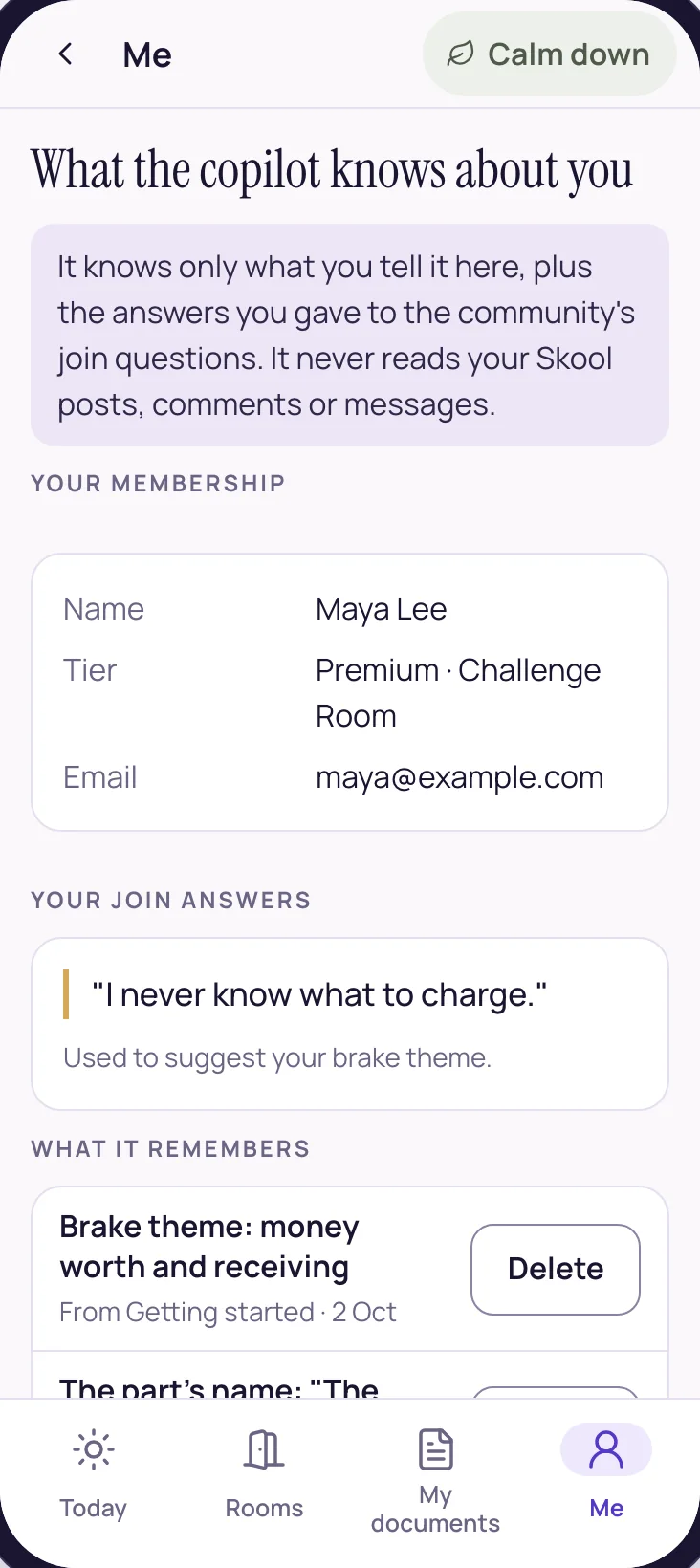
What the copilot knows about you, with a Delete button beside each thing it remembers

What the copilot knows

Only what you tell it in the app, plus the answers you gave to the community’s join questions. You can see each thing it remembers, and delete any of it.

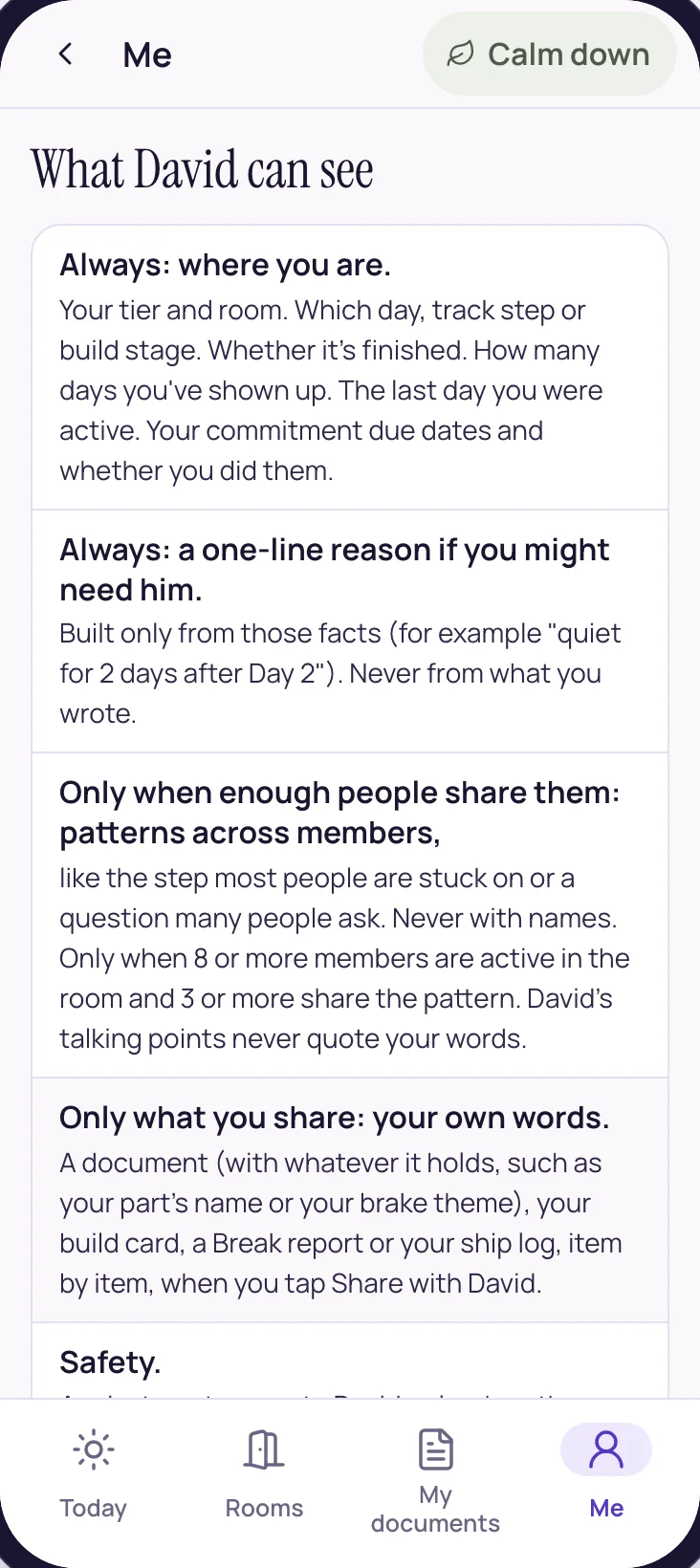
What David can see: where you are, never your words unless you share them

What David sees

Where you are, so he can prepare for the live sessions: your step, whether it’s finished, how many days you’ve shown up, your last active day, and whether you kept your commitments on their dates, plus a one-line note if you might need him, and your email address only when there’s a sign-in problem to sort out. Your words only if you tap Share with David on a document, a build card, a Break report or your ship log, one item at a time. Patterns across members only when enough people share them, never with names. A private note goes to David only when the copilot shows you the full help screen, and it never includes your words. A lighter question, like “That sounded heavy…”, tells no one.

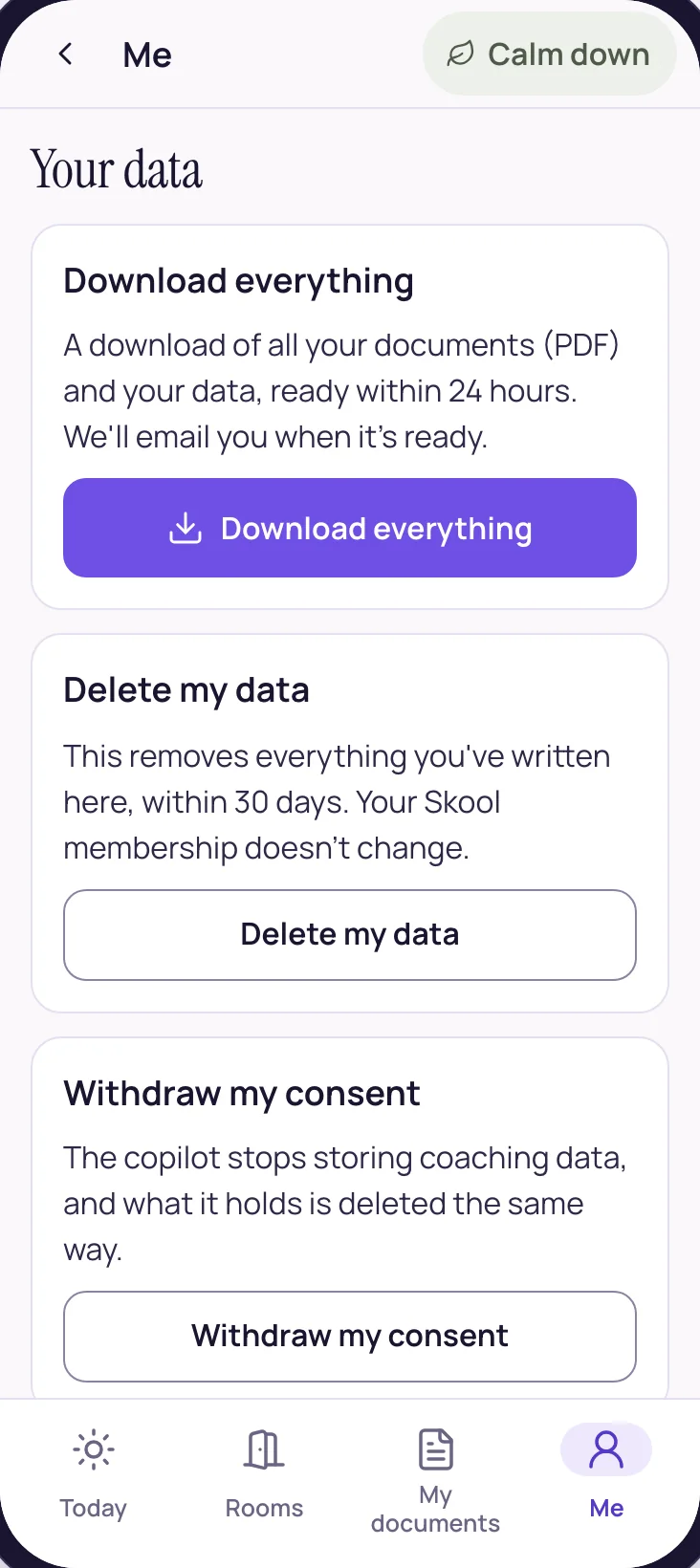
Your data: download everything, delete it, or withdraw consent

What you control

Download everything, delete it, or withdraw consent, all from the Me tab. Your writing is encrypted with a key tied to your account. If you leave, your work stays readable for 90 days with a download, then it’s deleted after one reminder email.

Here’s who it’s for

Honest qualification, both ways.

It’s for you if

  • You have something real to ship: a price, an offer, a page, a launch.
  • The draft exists, and the last ten percent keeps sliding to next week.
  • You want a month with a shape, and a finish line you actually cross.
  • You’d like the work tested before anyone sees it.
  • You want the brake handled inside the work, rather than in a separate session.

It’s not the right fit if

  • You need clinical care or crisis support. Please reach a professional; the app will point you to help, and it’s no substitute for it.
  • You want an AI to write and post everything for you.
  • You’d rather keep learning than put something in front of real people this month.
  • You’re looking for a manifesting shortcut.

Here’s what VIP gets

VIP includes Build Room Copilot, the live Build Room workshops, and everything in Premium. Each membership starts with a 7-day free trial.

Includes Build Room Copilot

VIP

$255a month

or $1,785 a year, five months free

Build Room Copilot: all of it

  • One real build a month, from Commit to Ship
  • Drafts in your voice, and a Break report before anyone sees the work
  • Check my flinch and release moves inside every build
  • Your ship log, private to you

Also in VIP

  • The Build Room: four live group workshops a month with David (Commit, Build, Break, Ship)
  • You leave holding a finished thing
  • The full session archive
  • Everything in Premium, including Challenge Copilot
Start the 7-day free trial of VIP, on Skool (opens the Abundance GPS community)

The 7-day trial opens a look inside Build Room Copilot and one sample Break report. The full copilot opens when your membership continues.

Premium

$55a month

or $385 a year, five months free

Build Room Copilot: a sample each quarter

  • One sample Break report each quarter
  • All of Challenge Copilot

Also in Premium

  • Every teaching course in the classroom, fully unlocked
  • A live group Q&A hour with David, every week
  • The monthly 4-Day Break-Free Challenge and the 4-week Deepening cycle
  • The Three Pillars and 324+ techniques woven through the courses
Start the 7-day free trial of Premium, on Skool (opens the Abundance GPS community)

The 7-day trial opens Day 1 of the Challenge in full, with daily check-ins.

VIP works out to about $8.40 a day for four live workshops a month with David, a copilot for your build on every day in between, and everything in Premium.

How the trial works

Every membership starts with seven free days. A card is needed to start, and you can cancel any time inside Skool. The VIP trial opens a look inside Build Room Copilot and one sample Break report, along with everything the Premium trial opens. The full copilot opens when your membership continues.

Already a member? Change your membership inside Skool, and the Copilot follows your tier.

The three AI apps, AI Quantum Growth Coach, AI Vision Weaver and AI Business StrategyOS, stay separate subscriptions.

The honest answers

Including the ones with careful answers.

Why is it called Build Room Copilot?

It’s named after The Build Room, VIP’s four live workshops a month with David, one for each step: Commit, Build, Break, Ship. Build Room Copilot carries the same four steps through the days in between, on your one real piece of work. You’re the one flying; it sits beside you.

What counts as a build?

One real piece of work that reaches other people this month: a new rate sent to clients, an offer page, a launch email. You decide what counts as shipped before you start, like “My new rate on my booking page by the 20th, one client told.”

What if I don’t ship it this month?

The card says “Not shipped yet”, never “failed”. You can continue last month’s build once, with a smaller definition of shipped, or choose a new one.

Can I bring my own build?

Yes. “Bring my own” lets you describe what you’ll ship this month. And if you’ve finished a Challenge, “Start from my Blueprint” suggests a build from the plan you made there.

How much time does a build take?

It depends on the build. The work moves one step at a time, alongside the four live workshops each month, and a catch-up for a stage takes about ten minutes.

Does it post for me?

Never. When you commit and when you ship, it drafts a short post for the community. You copy it and post it yourself, if and when you want to.

I’m on Premium. Can I try it?

Yes. Premium includes one sample Break report each quarter. Paste in an email, an offer or a page and see the full report, strengths first.

What does the VIP trial include?

A look inside Build Room Copilot and one sample Break report, along with everything the Premium trial opens. The full copilot opens when your membership continues.

Will David read my drafts?

Only if you choose. He sees where your build is—its stage, and whether it shipped—so he can prepare for the workshops. Your drafts and your words stay private unless you tap Share with David on the build card. A private note goes to David only when the copilot shows you the full help screen, and it never includes your words. A lighter question, like “That sounded heavy…”, tells no one.

Is this therapy?

No. It’s an AI coach, and it says so on every conversation screen. It works with beliefs, patterns and sensations, and it never asks you to tell the story of what happened. If you ever write something that sounds like you might need real help, it shows the crisis lines for your country straight away, with no questions first, and if it’s serious, coaching stops.

Are the three AI apps included?

No. AI Quantum Growth Coach, AI Vision Weaver and AI Business StrategyOS are separate subscriptions. Build Room Copilot comes with VIP.

Something not answered here? Ask us directly.

Why it exists

The workshops set the rhythm. The days in between needed it too.

VIP members meet David four times a month in The Build Room, one live workshop for each step: Commit, Build, Break, Ship. The work itself happens on the days in between, and that’s where it tends to stall.

Build Room Copilot was made for those days. It keeps one build moving, drafts it with you in your voice, tests it before it goes out, and meets the brake at each step, so the build keeps moving toward Ship.

What we do, in two sentences

We help conscious entrepreneurs with adverse childhood experiences get out of their own way and release their brakes — so they can multiply their income and magnify their impact.

Because manifesting is as natural as breathing. It is already running, and it is already obeying the conditioning it was handed. So the work is releasing the brakes, rising above that conditioning, and building real structure and flow around abundance — the mindset, the financial plumbing, the entrepreneurial steps.

One real build a month, from Commit to Ship.

  • A clear line for what shipped means, set before you start
  • Drafts in your voice, with the brake handled first
  • A Break report before anyone sees the work
  • A ship log of every build you ship, with its proof
  • Four live workshops a month with David, and everything in Premium
Start your 7-day free trial →

Seven days free on every membership. Cancel any time inside Skool.